
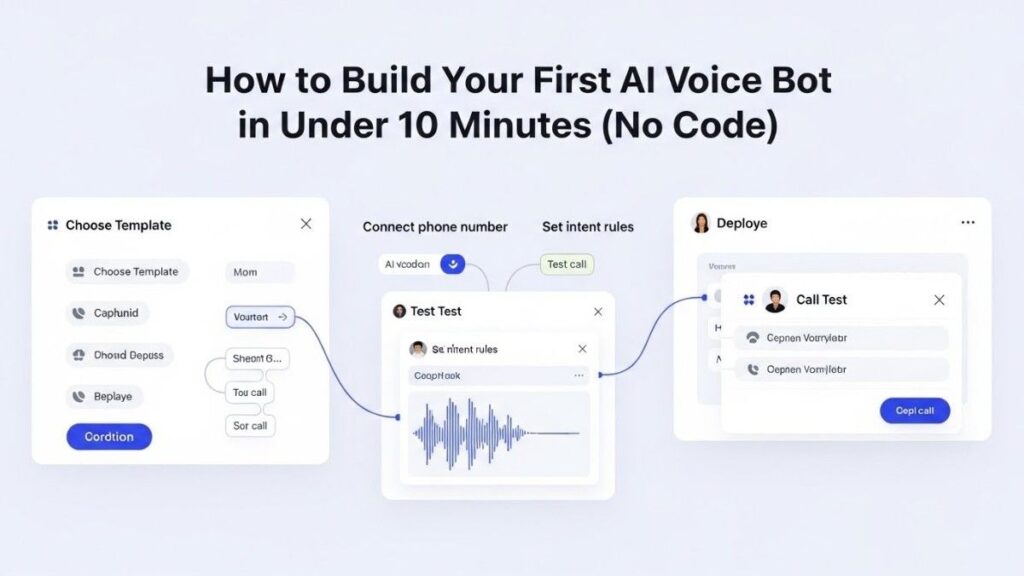
How to Build Your First AI Voice Bot in Under 10 Minutes (No Code)
Introduction
TL;DR Voice technology is everywhere. Alexa answers questions. Siri sets reminders. Google Assistant controls smart homes.
Table of Contents
Your business needs this technology too. Customer service calls pile up. Support tickets overflow. Clients want instant answers at 2 AM.
You need an AI voice bot, need it now, don’t need developers, don’t need coding skills, don’t need months of development time.
No-code AI voice bot builder platforms have changed everything. Anyone can create sophisticated voice assistants. The process takes minutes instead of months. The cost is affordable instead of astronomical.
Small businesses compete with enterprises. Solo entrepreneurs automate customer service. Startups scale without massive teams.
The barrier to entry has vanished. You simply need internet access and ten minutes of focused time.
This guide walks you through building your first voice bot today. No programming knowledge required, technical jargon,complicated processes.
By the end of this article, you’ll have a working AI voice assistant. Your customers can interact with it immediately. Your business will operate more efficiently starting today.
The future of customer communication is voice-driven. Your competitors are already building these systems. Every day without a voice bot costs you customers and revenue.
Let’s build yours right now.
Why Voice Bots Matter for Modern Businesses
Customers Expect 24/7 Availability
Business hours are obsolete. Customers live in different time zones. They call at midnight. They need help on weekends and holidays.
Hiring staff for round-the-clock coverage is expensive. A single employee costs $30,000-60,000 annually. Full 24/7 coverage requires multiple shifts and backup staff.
Voice bots never sleep. They answer every call instantly,handle unlimited concurrent conversations,work every holiday without overtime pay.
Your customers get immediate assistance regardless of when they contact you. Their satisfaction increases. Your operational costs decrease dramatically.
Voice is the Natural Way Humans Communicate
Typing feels tedious. Navigating websites frustrates users. Searching through FAQs wastes time.
Speaking comes naturally. Humans have conversed vocally for millennia. Voice requires no learning curve. Everyone already knows how to talk.
Voice bots meet customers where they’re comfortable. The interaction feels intuitive. Questions get answered in seconds instead of minutes.
Accessibility improves too. Elderly customers struggle with apps. Visually impaired users face website challenges. Voice provides equal access to everyone.
Scaling Customer Service Without Scaling Costs
Traditional customer service scales linearly. More customers require more staff. More staff means higher costs. Growth becomes expensive quickly.
Voice bots scale infinitely at fixed cost. One bot handles ten calls. The same bot handles ten thousand calls. Your subscription cost stays identical.
A no-code AI voice bot builder eliminates development expenses. No programmer salaries,ongoing maintenance fees,expensive updates.
Small businesses access enterprise-level technology. The playing field levels. Your three-person company provides service quality matching Fortune 500 corporations.
Data Collection and Customer Insights
Every voice interaction generates data. Customers reveal their needs, concerns, and preferences. This information is goldmine material.
Voice bots capture everything. They record common questions, identify pain points,track satisfaction patterns.
You learn what customers actually want. Product development improves. Marketing messaging sharpens. Service offerings expand strategically.
Manual tracking misses details. Human agents forget specifics. Voice bots remember everything and analyze patterns automatically.
What You Need Before Building Your Voice Bot
Clear Understanding of Your Bot’s Purpose
Define what your voice bot will accomplish. Answer customer FAQs? Schedule appointments? Process orders? Provide technical support?
Specific goals create better bots. “Help customers” is too vague. “Answer the 20 most common product questions” gives clear direction.
Write down your primary use case. List the exact tasks your bot should handle. Prioritize the most important functions first.
Starting narrow works better than starting broad. Master one function before adding complexity. You can expand capabilities after your initial bot succeeds.
List of Common Questions and Answers
Document the questions customers ask repeatedly. Review support tickets. Check email inquiries. Listen to recorded calls.
Write answers to these questions. Keep responses clear and concise. Use language your customers understand.
Organize information logically. Group related questions together. Create a simple reference document.
This preparation speeds up bot building significantly. You’ll have content ready to input. The bot becomes a digital version of your best knowledge base.
Your Brand Voice and Personality
How should your bot sound? Professional and formal? Friendly and casual? Somewhere in between?
Your bot represents your brand. Consistency matters. The voice should match your other customer touchpoints.
Decide on greetings and sign-offs. Choose appropriate language style. Determine how the bot handles frustration or confusion.
Write sample scripts showing your desired tone. These examples guide the bot’s personality development. Good examples prevent generic-sounding interactions.
Five to Ten Minutes of Uninterrupted Time
Building takes minimal time but requires focus. Distractions slow the process. Interruptions cause mistakes.
Close unnecessary browser tabs. Silence your phone. Find a quiet space. Set a timer for ten minutes.
You’ll finish within this timeframe. Most builders complete their first bot in six to eight minutes. The process is genuinely fast.
Treat this like any important meeting. Give it full attention. The small time investment yields massive ongoing returns.
Choosing the Right No-Code AI Voice Bot Builder
Key Features to Look For
The platform must offer true no-code AI voice bot builder functionality. Drag-and-drop interfaces work best. Visual workflows beat complicated menus.
Natural language processing quality matters enormously. The bot should understand varied phrasings of the same question. Rigid keyword matching creates frustrating experiences.
Voice quality separates good bots from bad ones. Robotic voices annoy callers. Natural-sounding speech keeps people engaged.
Integration capabilities determine usefulness. Your bot should connect to calendars, CRMs, payment systems, and other tools you use.
Analytics dashboards show performance. You need to see call volume, common questions, satisfaction ratings, and conversion metrics.
Customization options let you match brand identity. Voice selection, greeting messages, and response styles should all be adjustable.
Popular Platform Options
Multiple platforms offer no-code AI voice bot builder tools. Each has strengths and ideal use cases.
Voiceflow provides excellent visual design tools. The interface resembles flowchart building. Non-technical users master it quickly.
Bland AI specializes in phone call automation. Integration with phone systems happens smoothly. Voice quality is particularly strong.
Botpress offers robust conversation management. Complex dialogue trees are manageable. The learning curve is slightly steeper but capabilities expand accordingly.
Synthflow focuses on business automation. Appointment scheduling and CRM integration are seamless. Pricing suits small businesses well.
Retell AI excels at natural conversation flow. The AI handles interruptions and context switches impressively. Setup is remarkably simple.
Free Trials and Testing Options
Never commit without testing. Every major no-code AI voice bot builder offers trial periods.
Free tiers let you build and test without payment. Credit card requirements vary by platform. Some require payment information upfront while others don’t.
Trial periods typically last 7-14 days. This timeframe suffices for building and testing your initial bot. You’ll know if the platform works for you.
Test with real scenarios. Call your bot yourself. Have colleagues and friends test it. Gather honest feedback before subscribing.
Compare at least two platforms. Different tools feel different. What works for someone else might not suit you.
Pricing Structures and Value
Subscription models dominate the space. Monthly fees range from $30 to $300 depending on features and call volume.
Usage-based pricing charges per call or per minute. This works well for low-volume applications. High-volume users benefit from flat-rate subscriptions.
Calculate your expected call volume. Estimate how many conversations your bot will handle monthly. Match this to pricing tiers appropriately.
Consider included features at each tier. Does the price include analytics? Are integrations available? What’s the call quality at this level?
Annual subscriptions usually offer discounts. Paying yearly saves 15-25% compared to monthly billing. Commit annually once you’ve validated the platform works.
Step-by-Step: Building Your First Voice Bot
Sign Up and Access the Builder
Visit your chosen no-code AI voice bot builder website. Click the signup button prominently displayed on the homepage.
Enter your email address and create a password. Some platforms offer social login through Google or Microsoft accounts.
Verify your email if required. Check your inbox for a confirmation message. Click the verification link provided.
Log into the platform for the first time. Most tools show a welcome tutorial or quick start guide. Watch this if available.
Navigate to the bot creation section. This might be called “Create New Bot,” “Start Building,” or similar phrasing.
The main builder interface appears. This is your workspace for the next several minutes.
Name Your Bot and Set Basic Parameters
Choose a descriptive name. “Customer Support Bot” or “Appointment Scheduler” works better than generic names like “Bot 1.”
Select your bot’s voice. Most platforms offer 10-30 voice options. Listen to samples. Pick one matching your brand personality.
Male or female voice? Regional accent? Age perception? These choices affect user comfort and trust.
Set speaking speed. Most users prefer slightly slower than normal conversation. Rushed speech causes comprehension problems.
Choose language if your platform supports multiple options. English, Spanish, French, and other major languages are commonly available.
Save these initial settings. You can modify them later but starting right establishes good foundations.
Create Your Welcome Message
Write what your bot says when someone calls. This greeting sets the entire interaction tone.
Keep it brief. “Thanks for calling ABC Company. I’m your AI assistant. How can I help you today?” works perfectly.
State who you are clearly. Transparency about being an AI builds trust. Deception damages credibility.
Make the call to action obvious. Ask an open-ended question. Invite the caller to explain their need.
Record or generate the greeting. Most no-code AI voice bot builder platforms use text-to-speech automatically. You type the words and the system creates audio.
Test the greeting immediately. Play it back. Does it sound natural? Does it represent your brand well?
Build Your Main Conversation Flow
Map out the primary paths conversations will take. Most interactions follow predictable patterns.
Create intent categories. These represent what users want to accomplish. Common categories include “Check Status,” “Schedule Appointment,” “Get Information,” and “Speak to Human.”
Link questions to intents. When someone asks “What are your hours?” that triggers the “Get Information” intent about business hours.
Write responses for each intent. These should directly answer the question. Include relevant details without overwhelming callers.
Add follow-up options. After answering a question, ask “Is there anything else I can help you with?” This keeps the conversation flowing naturally.
Use the visual builder to connect these elements. Drag boxes representing different intents. Draw arrows showing conversation flow.
Most platforms use a flowchart-style interface. Understanding comes quickly even for visual-thinking non-programmers.
Add Frequently Asked Questions
Input your most common questions. You compiled these during preparation. Now you teach them to your bot.
Each question needs sample phrasings. People ask the same thing different ways. “What are your hours?” “When are you open?” “What time do you close?” all seek identical information.
Provide the answer once. The bot matches varied questions to the single answer. Natural language processing handles the complexity.
Include 10-20 FAQs initially. This covers most basic inquiries. You’ll add more based on real usage patterns.
Format answers conversationally. Write like you’re talking, not writing an email. Contractions are fine. Short sentences work best.
Test each FAQ individually. Ask the question in your own words. Verify the bot responds correctly.
Configure Handoff to Human Support
Determine when humans should take over. Complex problems? Angry customers? Technical issues beyond the bot’s knowledge?
Create a clear handoff trigger. Phrases like “speak to a person” or “talk to someone” should immediately transfer.
Set up your transfer method. Does the bot transfer the call? Send a callback request? Create a support ticket?
Provide smooth transition language. “I’ll connect you with someone who can help” beats “I don’t know.”
Test the handoff process thoroughly. Make sure transfers actually work. Verify humans receive proper context about the conversation so far.
Configure backup options if humans aren’t available. Voicemail? Email? Text message? Callers need next steps when transfers fail.
Step 7: Test Everything Thoroughly
Call your bot using the test number provided. Experience it as a customer would.
Try different questions. Use varied phrasing. Speak naturally, not robotically.
Test misunderstandings. Say something completely random. How does the bot handle confusion?
Verify all integrations work. If the bot schedules appointments, confirm they appear on your calendar. If it creates tickets, check your CRM.
Have colleagues test without coaching. Their fresh perspective catches issues you’ll miss. Their confusion reveals unclear bot responses.
Record these test calls if possible. Review them critically. Note every awkward moment or confusing response.
Make adjustments based on testing. Refine unclear responses. Add missing questions. Improve conversation flow.
Launch and Monitor
Activate your bot for real customer calls. Most platforms require toggling from “test mode” to “live mode.”
Start with limited exposure. Route 25% of calls to the bot initially. Keep humans handling the majority until you’ve validated performance.
Monitor conversations obsessively in the first days. Listen to recordings. Read transcripts. Identify problems immediately.
Track key metrics from day one. Call completion rate. Satisfaction scores. Transfer rate to humans. Time to resolution.
Gather customer feedback actively. Ask callers to rate their experience. Send follow-up surveys after bot interactions.
Expand bot usage gradually. Increase the percentage of calls it handles. Scale up as confidence grows.
Common Mistakes to Avoid
Trying to Handle Too Much Initially
New bot builders create overly ambitious first projects. They want to handle every possible scenario. The bot becomes overwhelmed with complexity.
Start small and specific. Handle three to five common tasks excellently. Ignore edge cases initially.
Master the basics before adding advanced features. A simple bot that works beats a complex bot that confuses everyone.
You can always expand capabilities. Week two adds more questions. Month two introduces new features. Growth happens iteratively.
Complexity creates maintenance burdens. Simple bots require minimal upkeep. Complicated systems demand constant attention.
Using Robotic or Overly Formal Language
Your bot shouldn’t sound like a legal document. Stiff corporate language alienates callers.
Write like you talk. Use contractions. Keep sentences short. Eliminate jargon.
“We would be delighted to assist you with your inquiry” becomes “I’d be happy to help!”
Read responses aloud. Do they sound natural? Would you say this in conversation? If not, rewrite.
Your bot represents your brand personality. Corporate doesn’t mean boring. Professional doesn’t require formality.
Forgetting to Update and Improve
Launching your no-code AI voice bot builder project isn’t the finish line. It’s the starting line.
Conversations reveal gaps in bot knowledge. Customers ask questions you didn’t anticipate. These become improvement opportunities.
Schedule weekly bot reviews. Examine conversation transcripts. Identify patterns in confusion or failure.
Add new questions monthly. Update answers as business policies change. Refine responses based on feedback.
Stagnant bots become outdated quickly. Active maintenance keeps performance high and customers satisfied.
Poor Error Handling
Every bot encounters situations it can’t handle. Users say unexpected things. Speech recognition fails occasionally. Systems experience errors.
Plan for failure gracefully. “I didn’t catch that, could you rephrase?” works better than silence.
Provide alternative paths. If the bot can’t answer verbally, offer to text information or schedule a callback.
Set maximum confusion tolerance. After three failed attempts to understand, transfer to a human automatically.
Apologize when appropriate. “I’m having trouble with that question” acknowledges the issue without blaming the caller.
Advanced Features You Can Add Later
Calendar Integration for Appointment Scheduling
Connect your bot to Google Calendar, Outlook, or scheduling tools like Calendly. Customers book appointments during calls.
The bot checks your availability in real-time. It offers open time slots. Customers select their preference.
Confirmations send automatically via email or text. Reminders go out before the appointment. The entire scheduling workflow becomes automated.
Setup takes an additional 10-15 minutes. Most no-code AI voice bot builder platforms include pre-built calendar integrations.
This feature eliminates phone tag. Customers schedule instantly without human assistance. Your calendar fills while you focus on other work.
CRM Integration for Personalized Service
Link your bot to customer relationship management systems. Salesforce, HubSpot, Zoho, and similar platforms connect easily.
The bot recognizes returning customers. It greets them by name. It references their history.
“Welcome back, Sarah. Are you calling about your order from last week?” creates personalized experiences.
Customer data updates automatically. Conversations add notes to CRM records. Your team sees complete interaction history.
This integration transforms generic bots into intelligent assistants. Customers feel recognized and valued.
Payment Processing Capabilities
Enable customers to make payments through voice commands. They provide payment information verbally. The bot processes transactions securely.
PCI compliance requires careful handling. Choose platforms with certified payment integrations. Never store sensitive payment data directly.
Customers can pay invoices, renew subscriptions, or purchase products entirely through voice interaction.
Convenience drives conversion. Customers complete transactions immediately instead of remembering to pay later.
Multilingual Support
Expand your reach by adding multiple languages. Your no-code AI voice bot builder can detect caller language automatically.
Spanish speakers get responses in Spanish. French speakers hear French. The same bot handles all languages seamlessly.
Translation happens automatically. You write responses once. The platform handles language conversion.
This feature opens new markets without hiring multilingual staff. Your business serves diverse populations equally well.
Sentiment Analysis and Escalation
Advanced bots detect caller emotion. Frustration, anger, or confusion trigger different responses.
Upset customers get expedited transfers to humans. Happy customers receive upsell opportunities. Confused callers get simpler explanations.
The bot adjusts its approach based on emotional cues in voice tone. Empathy improves even though the assistant is artificial.
This sophistication prevents bad experiences from escalating. Problems get resolved before customers become truly angry.
Measuring Success and Improving Performance
Key Metrics to Track
Call completion rate shows how often callers accomplish their goals without human intervention. Aim for 70-80% initially.
Average call duration indicates efficiency. Shorter isn’t always better, but 2-3 minutes suggests good flow.
Transfer rate to humans reveals bot limitations. Under 20% is excellent. Over 40% suggests significant improvement opportunities.
Customer satisfaction scores provide direct feedback. Post-call surveys asking “Did this help?” generate actionable data.
Cost per interaction drops dramatically with bots. Calculate savings by comparing bot costs to human agent costs.
Conversation abandonment rate shows caller frustration. If people hang up mid-call frequently, your bot needs work.
Analyzing Conversation Transcripts
Read what customers actually say. Their language reveals needs, frustrations, and confusion points.
Identify questions the bot can’t answer. These become your priority additions. Common unanswered questions cost you the most.
Look for patterns in successful conversations. What makes interactions flow smoothly? Replicate these elements throughout your bot.
Notice where customers get confused. Unclear bot responses need simplification. Revise confusing language immediately.
Track how customers phrase questions. Real language often differs from your assumptions. Teach your bot customer vocabulary, not corporate jargon.
A/B Testing Different Approaches
Test greeting variations. Does “How can I help you?” outperform “What brings you here today?” Data reveals winners.
Experiment with voice options. Try different accents or genders. Measure which generates higher satisfaction.
Test response length. Do detailed answers work better or do people prefer brevity? Results might surprise you.
Try different error handling approaches. Compare friendly versus formal apology language. Optimize based on performance.
Most no-code AI voice bot builder platforms include A/B testing tools. Use them regularly. Continuous optimization compounds improvements.
Gathering Customer Feedback
Ask directly after calls. “Please rate your experience from 1-5” provides quantitative data.
Invite detailed feedback. “What could we do better?” captures qualitative insights.
Send follow-up surveys via email or text. Include questions about bot performance specifically.
Monitor social media mentions. Customers share bot experiences publicly. Track this unsolicited feedback.
Respond to negative feedback quickly. Acknowledge problems. Explain improvements you’re making. Turn critics into advocates.
Real-World Use Cases Across Industries
Restaurants: Reservations and Orders
Restaurants use voice bots for table reservations. Customers call anytime. The bot checks availability and confirms bookings.
Takeout orders happen entirely through voice. Customers describe what they want. The bot confirms order details and provides pickup times.
Menu questions get answered instantly. “Is this dish gluten-free?” “Does that contain nuts?” The bot knows your entire menu.
Special requests get captured accurately. No miscommunication between phone staff and kitchen. Orders are recorded digitally from the start.
Healthcare: Appointment Scheduling and Reminders
Medical practices use bots for appointment booking. Patients call directly without navigating phone trees.
Reminder calls reduce no-shows dramatically. The bot calls patients 24 hours before appointments. Patients confirm or reschedule vocally.
Basic triage happens through conversation. Symptoms described verbally help route to appropriate care levels.
Prescription refills become automated. Patients request refills by voice. The bot verifies information and contacts pharmacies.
HIPAA-compliant platforms protect patient privacy. Medical information stays secure while accessibility improves.
E-commerce: Order Status and Support
Online stores deploy bots for order tracking. “Where’s my package?” gets instant answers. The bot checks shipping status in real-time.
Return processes start through voice interaction. Customers explain issues. Bots generate return labels and provide instructions.
Product questions receive immediate answers. Size information, compatibility details, and usage instructions flow naturally through conversation.
Upsell opportunities emerge during support calls. Customers calling about one product hear about complementary items.
Real Estate: Property Information and Showing Schedules
Real estate agents use voice bots to provide property details. Callers request information about specific listings. Bots share prices, features, and availability.
Showing schedules fill automatically. Interested buyers book tours through voice commands. Calendar integration prevents double-bookings.
Qualification happens conversationally. The bot asks about budget, timeline, and preferences. Agents receive pre-qualified leads.
Follow-up calls keep leads warm. The bot checks in with prospects who viewed properties. It schedules follow-up showings or answers additional questions.
Professional Services: Consultation Booking and Client Intake
Lawyers, accountants, consultants, and coaches use bots for scheduling. Potential clients book initial consultations directly.
Intake forms complete through conversation. The bot asks qualifying questions. Answers populate your CRM automatically.
Payment collection happens before appointments. Consultation fees process vocally. No-shows decrease when people have financial commitment.
Document requests become automated. The bot reminds clients to upload necessary files before meetings.
Troubleshooting Common Issues
Bot Doesn’t Understand Caller
Speech recognition fails occasionally. Background noise interferes. Strong accents challenge some systems.
Improve recognition by adjusting microphone sensitivity settings. Most platforms offer audio quality adjustments.
Add more sample phrasings to each intent. The more examples you provide, the better recognition becomes.
Reduce background noise sensitivity if possible. Some systems filter noise automatically while others need manual adjustment.
Consider offering alternative input methods. Allow callers to switch to keypad entry if voice fails repeatedly.
Conversations Feel Unnatural
Robotic responses alienate callers. Overly formal language creates distance. Poor flow frustrates users.
Rewrite responses in conversational language. Read them aloud. Adjust anything that sounds unnatural.
Add personality touches. Humor where appropriate. Empathy for problems. Enthusiasm for opportunities.
Vary response structures. Don’t start every sentence identically. Mix question types and statement formats.
Test with real people unfamiliar with your business. Their honest reactions reveal awkward moments you’ve stopped noticing.
Integration Failures
Connected systems sometimes stop communicating. Calendar appointments don’t sync. CRM updates fail. Payment processing errors occur.
Check API credentials first. Authentication tokens expire. Refresh connections through platform settings.
Verify permissions remain active. System administrators sometimes change access rights. Re-authorize integrations if needed.
Test integrations individually. Isolate which specific connection fails. This narrows troubleshooting focus.
Contact platform support for persistent issues. Most no-code AI voice bot builder providers offer integration assistance.
High Transfer Rate to Humans
Frequent transfers to humans suggest bot limitations. Either it lacks necessary information or can’t handle common questions.
Review transfer conversation transcripts. Why did these calls need humans? What questions couldn’t the bot answer?
Add missing information to bot knowledge base. Teach it to handle previously problematic questions.
Improve error handling. Sometimes transfers happen because the bot gives up too quickly. Increase attempt tolerance.
Refine intent recognition. Misunderstood questions lead to transfers. Better training reduces misunderstanding.
Security and Privacy Considerations
Protecting Customer Data
Voice conversations contain sensitive information. Names, addresses, payment details, and personal concerns all flow through bots.
Choose platforms with strong encryption. Data should encrypt during transmission and at rest.
Understand data retention policies. How long does the platform store recordings? Can you delete them? Who has access?
Implement access controls. Limit which team members can review conversations. Not everyone needs full access.
Comply with regulations like GDPR, CCPA, and industry-specific requirements. Your no-code AI voice bot builder should facilitate compliance, not complicate it.
PCI Compliance for Payment Processing
Accepting payments vocally requires Payment Card Industry compliance. Never store credit card numbers in plain text.
Use platforms with certified payment integrations. They handle PCI requirements. You inherit their compliance.
Avoid building custom payment systems. Pre-built integrations are tested and certified. Custom solutions risk security vulnerabilities.
Train your bot to never repeat credit card numbers aloud. Confirmation should use last four digits only.
HIPAA Compliance for Healthcare
Healthcare applications must comply with Health Insurance Portability and Accountability Act requirements.
Choose explicitly HIPAA-compliant platforms. They sign Business Associate Agreements. They maintain required security standards.
Encrypt all health information. Patient conversations contain protected health information by definition.
Implement strong access controls. Audit who accesses patient conversations. Maintain detailed logs.
Train bots to avoid sharing sensitive information broadly. Verify caller identity before discussing patient details.
Recording and Consent
Laws regarding call recording vary by location. Some jurisdictions require one-party consent. Others mandate two-party consent.
Notify callers about recording upfront. “This call may be recorded” satisfies most legal requirements.
Provide opt-out options where legally required. Allow callers to decline recording if they prefer.
Store recordings securely. Limit access. Delete when no longer needed for business purposes.
Use recordings for improvement, not surveillance. Focus on bot enhancement, customer experience, and quality assurance.
Read More:-AI-Driven Customer Journey Mapping for Businesses
Conclusion
You’ve learned everything needed to build your first AI voice assistant. The process takes under ten minutes. No coding skills are required. No technical degree is necessary.
No-code AI voice bot builder platforms have democratized voice technology. Small businesses access tools previously available only to Fortune 500 companies.
Your competition is already building these systems. Every day without a voice bot puts you further behind. Customer expectations grow constantly. Service standards rise continuously.
The investment is minimal. Monthly subscriptions cost less than a single employee day’s wages. The return is massive. Automated customer service that never sleeps, never calls in sick, and never asks for raises.
Implementation takes minutes. Testing takes hours. Improvement happens continuously. Your bot becomes smarter with every conversation.
Start today, not tomorrow. Choose a no-code AI voice bot builder platform. Sign up for a free trial. Spend ten focused minutes building your first bot.
Test it thoroughly. Refine based on feedback. Launch to real customers. Monitor performance closely.
Iterate and improve weekly. Add new capabilities monthly. Expand gradually as you master the basics.
Your business transforms through this technology. Customer satisfaction increases. Operational costs decrease. Scalability becomes infinite.
The barriers have fallen. The tools are ready. The time is now.
Build your first AI voice bot today. Your customers are waiting. Your business growth depends on it.
Stop reading. Start building. Ten minutes from now, you’ll have a working voice assistant.
Your voice bot journey starts this moment. Make it count.